Creating a Digital Estate Plan – Social Media

This is the fourth post in my series, Organizing My Life, my ongoing project to create a roadmap for when I am no longer in the driver’s seat.


There it was. Mixed in with various Facebook posts about exotic vacations, family celebrations, and funny memes, was a notice of a friend’s passing. She had moved away several years ago and, although we weren’t especially close, we had stayed in sporadic touch via social media. I had no idea that she was even sick.

This was the third time in several years that I have learned of a friend’s death via Facebook. In each case, the woman’s husband had shared the sad news on his wife’s account. As tough as it must have been to write that post, I was grateful to have been notified.

As part of my ongoing Organizing My Life project, I have set up a password manager and made lists of various accounts and important contact information. What I hadn’t thought about were my social media accounts and what should be done with them when I’m no longer, shall we say, socially active. While my neglected Instagram and little used BlueSky and Pinterest accounts could probably be left to wither in the ether, what about my Facebook account and this blog? I imagine that they could be left open and untended, but have you ever received a Facebook birthday reminder from a friend who you know has died? It’s kind of creepy.

So, how would I like these accounts managed after I’m gone? Would I like one final message posted on Facebook before my account is deleted? My husband knows many of my friends but certainly not all of them and a Facebook post could help ease his burden to let people know. If I would like him – or whoever is managing my estate – to post a notice, is that something I’d like to write myself beforehand? How long do I want the message to be visible before shutting down my account?

How about this blog? Some bloggers just suddenly vanish, leaving their followers to wonder what happened. Others have found solace in the blogging community and have continued to write despite their illness. A final message posted by a loved one is one we never want to see, but again, I am grateful to be notified. Like Facebook, the wording of the message and how long to keep the account active needs to be considered.  

Obviously, there is no right or wrong answer, but it’s something to think about and discuss with my husband. He doesn’t have a blog and isn’t on Facebook so, if I want him to post a notification, I’d have to clue him in on the process. Alternatively, I could designate a friend who is more familiar with these platforms to be the one to post a notice.

How about you? Have you thought about how you’d like your various social media accounts to be handled when you can no longer manage them? (In addition to the three I mentioned, other platforms might include Twitter, LinkedIn, TikTok, Snapchat, etc.) Documenting clear instructions for each one ensures that they are managed as you wish.  


Previous posts in the series:

Organizing My Life

Organizing Passwords and Other Secret Codes

What would you Grab if you had to Go?

Copyright © 2025 RetirementallyChallenged.com – All rights reserved.

What would you Grab if you had to Go?

My husband and I were relaxing on our deck a few days ago when we noticed several planes circling to the east of us. All three were mostly white with red markings and lettering. When one of the planes flew close enough to our house, we could clearly read the words CAL FIRE on the underbelly. That’s when we noticed the brown smoke in the distance.

The fire, I soon learned from checking social media, had started in a canyon a couple of miles from our home. A small brush fire when it was first reported, quickly grew to an estimated five acres. We live a reasonably safe distance away but those whose homes were close to the canyon’s rims, received evacuation notices.

The great news is that the fire was brought under control within a couple of hours. No homes were damaged and everyone who evacuated was able to return home safely. With the memory of January’s devastating Southern California wildfires fresh in our minds, I imagine everyone living within a few miles of the canyon fire heaved a huge sigh of relief. We know how a small brush fire can spread quickly, consuming tens of thousands of acres, destroying thousands of homes, and threatening lives.

After the smoke cleared and the planes were gone, my husband and I talked about what we would take if we had to evacuate our home. Whether we had the luxury of time or just minutes, what would we grab first? I mentioned family photos, a few items of personal or monetary value, my laptop, and important paperwork. A change of clothes would probably be helpful too. As I looked around our house, I didn’t see many items that I either couldn’t do without or that couldn’t be easily replaced. The possibility of losing everything really focuses you on what is important.

Old family photos are often at the top of people’s grab first list.

This conversation has encouraged me to give a lot more thought to the question: What would I take? What’s important? What is irreplaceable? What would we need to sustain us if we couldn’t return to our home – assuming we still had one – for a while? What would we need to help us recover any losses?

Where we live, wildfires and earthquakes are the biggest threat. For others, it might be floods, tornados, or hurricanes. I am not aware of any location that is completely safe from a natural disaster. Although we don’t dwell on threats, being prepared for what ifs can help give us peace of mind.

Creating a Grab and Go evacuation plan wasn’t on my original Organize My Life to-do list but in the wake of recent events, I have added it and moved it to the top.

I don’t have a final list yet, but here is my initial outline:

  • List of items that will be needed if away from home for any length of time, or that are valuable and/or irreplaceable. Don’t forget medications.
  • List of personal records that may be needed (insurance, financial, medical, etc.).
  • List of passwords, PINs, and codes that may be needed.
  • Make a separate list of items to take if there is more time to pack before evacuation.

On both lists, indicate where the items are located. If anything needs to be gathered quickly, ensure those items and records are easily accessible (if your precious photos or family heirlooms are buried in a storage closet, you may not have time or the ability to grab them before you have to leave).

This is a list that I hope to never need, but I will feel better when it’s completed. Better to consider what to take now rather than when feeling worried and stressed.   

Do you have a Grab and Go list for your home? Can you think of anything I should add to my list?

Copyright © 2025 RetirementallyChallenged.com – All rights reserved.

Organizing Passwords and Other Secret Codes

This is the second post of my ongoing Organizing My Life project

Do you have any idea how many passwords you have? I didn’t, and when I counted them, I was shocked. Some of them are rarely used, but many are important gateways into my medical portal, insurance policies, and financial information, as well as into services, retail websites, and other business accounts I access regularly.    

I had what I thought was a fairly clever system for recalling each password. For each of my 100+ passwords, I wrote a memory prompt in my password book that meant something to me but would be indecipherable to anyone else. Unfortunately, that “anyone else” included my husband. If something were to happen to me, he wouldn’t know what accounts are out there, how to access them, and what to do with them.

How secure are your passwords?

After some research, I decided that the best solution was to sign up for a password manager (PM) service. There are several good ones available, ranging in price from free to a few dollars a month. After narrowing my top choices down to three, I selected the one that had the combination of services and support that was right for us.  Our “family Plan” allows my husband and me to set up our individual accounts and also share access to any accounts – such as joint banking accounts – we both use.  

There was a bit of a learning curve to set the PM service up, but after watching a few YouTube tutorials (Ask Leo has some great how-to tech videos), I found the process to be fairly simple. Once complete, all you need to do is remember one long “master password” and the service does the rest. This was especially handy on our recent road trip when I had to access a few of our accounts. My one master password was all I needed.   

Of course, passwords are just part of the puzzle. For instance, you also might have PIN codes for ATMs, home security systems, garage and front door locks, combinations for safes and lockers, safe words or phrases for alarm companies, authenticator apps, and answers to secret questions. And, don’t forget your phone’s unlock code, your computer’s access code, and your Wi-Fi password. If something happens to you, the person managing your affairs will need many of these codes to move forward.  

A robust PM provides an encrypted vault to store not only passwords and secret codes but also digital copies of your driver’s license, birth certificate, passport, social security card, marriage license, etc. If these documents were destroyed in a fire or natural disaster, by storing copies in your PM you’d be able to access them online. Even if you opt not to store these items in a PM, you might want to share them with a trusted family member or friend.

After I get all my passwords and other information into my PM, my next project is to organize my contact information. Spoiler alert: Like organizing my passwords and codes, listing my important contacts won’t be as simple as typing a column of names and phone numbers.

If you’d like to follow my ongoing project to organize my important information, please start with the link below. I will post updates now and then as I complete each task.   

Organizing My Life  

Organizing My Life

If you are like many of us who have reached a certain age, your focus is on acquiring less and purging more. Paring down, organizing, and decluttering has become the mantra of many retirees who are interested in de-stuffifying their homes. As you are off-loading what you don’t want, have you also considered organizing what is left so that someone can easily manage your affairs if/when you can’t?

My husband and I have had several wake-up calls recently that have prompted us to take action. Over the past year, several friends and family members have experienced major illnesses and other physical or mental declines. One recent death in particular, where the surviving partner was left with a mess of papers and little documentation, made us realize the importance of organizing our information now for when we are no longer around.

Before so much of our lives were online, gathering the necessary documents and financial data was a fairly simple task. Now, not only are many of these documents digitized somewhere in some cloud, but there are multiple passwords, PINs, secret codes, social media accounts, online subscriptions, etc. that need to be considered. Think about the family member or friend taking over for you; without a roadmap, they probably wouldn’t know where to start.

There are various tools available to help organize your information. I’ll cover a few of them in a future post.

I’ve been doing a lot of reading and online research to help create that roadmap. Since we established our Trust years ago (note to self: it’s time to get it updated), my main focus will be on organizing information not contained in that document. A project like this can be time-consuming and feel overwhelming so I’ve broken it down into doable chunks to be tackled over several months. Since others may have a similar project, I will share my progress from time-to-time as I work through my list:

  • Organize passwords and codes
  • Create an estate blueprint
  • Document Home Operating Systems
  • Make a list of important contacts
  • Update Trust and write Letter of Last Instructions
  • Document any debt, credit, and insurance
  • Create my Personal Medical Journal
  • Create a Digital Estate Plan
  • Document personal possessions to distribute
  • Write an Ethical Will
  • Plan for what happens next

I get that most people feel uncomfortable thinking about their mortality. I’m healthy and active now so I’d rather not think about it either. But, after seeing a loved one struggle with legal and logistical issues while dealing with her profound grief, I don’t want to put anyone through that experience. I expect, like decluttering my home, I will feel much better when I’m done. I also imagine that the person managing my estate will appreciate that I organized my life and left them a roadmap.

Copyright © 2025 RetirementallyChallenged.com – All rights reserved.

Desktop Travel

A few weeks ago, I wrote that my computer had died and needed to be replaced. Although I wasn’t happy about the inconvenience or expense, I have discovered a silver lining (and, don’t we all need a few extra silver linings these days).

Sometime early last year, I took on the challenge of culling and organizing my digital photos. It took me several weeks to go through them all, delete duplicates and disappointments, and finally create eight distinct topic folders under which my images could be filed. Full disclosure that one of the eight folders was titled “Miscellaneous” but… whatever. I was awfully proud of myself when I finished and have been careful to keep everything mostly organized since then.

Until…

When setting up my new computer, old files were transferred from my two back-up hard drives to my desktop. Although this was done by a “professional,” the way the transfer was made pretty much set me back to square one. Suddenly, my new computer was full of all the duplicates and disappointments I had previously gotten rid of and there were multiples of everything, including several copies of the eight organized folders.

Someone less anal and terrified of losing anything probably would have just kept one complete set of the eight folders and deleted everything else. Not me. I had to go through everything once again to be sure what I was keeping and deleting was what I wanted to keep and delete.

I have finally finished the job and the images in my Pictures folder are all organized in their correct folders. No duplicates and very few disappointments (not every photo is a winner but some of the less-than-perfect ones can still be quite loveable).

I knew the task would be time-consuming; what I didn’t expect was how uplifting it would be. I got to travel again to Cuba, Canada, and Mexico, enjoy a cross-country road trip with my girlfriend, visit the Pacific Northwest and Atlantic Northeast, tour San Francisco and Key West, and get my kicks on Route 66.  

I also was able to travel back in time and enjoy dinner parties with friends and family, summer gatherings on our deck, and celebrations – large and small – with absolutely no social distancing, masks, or BYOEverything.

It was glorious.

If you are like me and have a lot of pictures filed away on your computer, I encourage you to do some time travel of your own. Just because flights have been canceled, travel delayed, and planned get-togethers put on hold, doesn’t mean you can’t enjoy a trip down memory lane.

It might be a good time to organize your photos and make sure everything is backed up, too.

Useful Travel Hacks

Hack: A strategy or technique adopted in order to manage one’s time and activities in a more efficient way. Any method of doing something that either simplifies or makes your life easier.

Our retirement has allowed us to do a fair amount of traveling, for which we are very grateful. Although we enjoy being home and the day-to-day familiarity of our city, neighborhood, and friends, we are always looking forward to our next adventure. In fact, before we put away our luggage after a trip, we make sure that, zipped inside, are items we don’t want to forget when we hit the road again.

Our list of travel hacks has developed over time. As we identify items that are handy to have or we wish we had packed, we add them to the list. Nothing is expensive or unusual (in fact, you probably have most of them already) but they may not be what most people think to pack.

Nightlight
Hotel rooms and other lodging can be very dark at night, especially if they have blackout curtains. Pitch darkness and an unfamiliar room layout can lead to bumped shins, stubbed toes, and maybe even finding yourself in the closet rather than the bathroom. We bring along a nightlight just in case our room is too dark to safely get around.

Binder Clips
If the problem instead is light leakage because the curtains don’t close properly, large binder clips are great for pulling the edges of the curtains together.

Electrical Tape
Have you ever turned off the lights in a hotel room only to find a bunch of bright lights lighting up the room? Not only can clock radios and microwave displays light up a room, TVs and smoke detectors have teeny LED lights that can drill into your eyes, especially if you are light-sensitive. A piece of electrical tape can cover these lights and let you sleep.

Flip Flops
Maybe it’s just us, but we don’t like to walk around barefoot in hotel rooms, so each of us keeps a cheap pair of flip flops by our bedside. We also wear them in the shower. They don’t take up much room in our luggage and they make us more comfortable.

Long Charging Cord
Electrical outlets found on the road are often inconveniently located. Having a long charging cord (ours are 10 feet long) makes it easier to plug in wherever you are.

Pouch of Useful Stuff
On our earlier travels, when we needed items like rubber bands, paper clips, small binder clips, highlighters, scissors, or post-it notes, we would have to take the time to find a store. In addition, we often had to buy a lot more than we wanted (a box of rubber bands instead of the two or three that we needed). Finally, I got smart and put together a small travel-size supply of these items. When we get home, I resupply my yellow pouch of useful stuff and put it back in my suitcase for our next trip.

Personal Business Cards
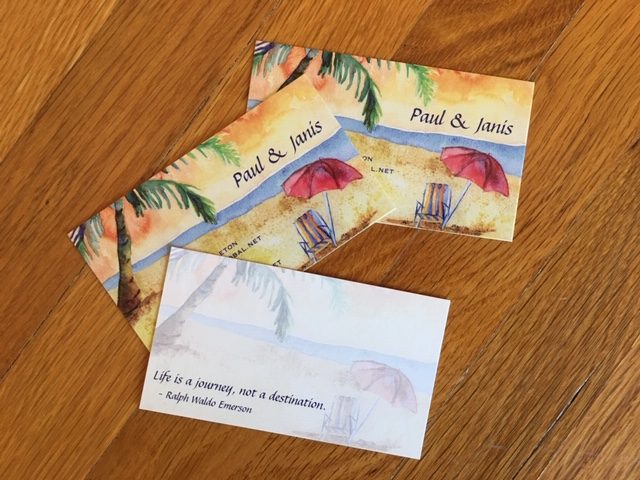
Soon after we retired, we had personal business cards printed. Now when we meet people we want to keep in touch with, we hand them one of our cards. This avoids the need to scramble for a pen and a piece of paper to write down our contact info (our cards have our names, email addresses, and phone numbers). A card has less chance of getting lost than a scrap of paper and it’s easier to read. There are a lot of companies that print business cards (we used Vistaprint) and most offer a ton of design choices. We picked a two-sided design so we could print a travel quote on the back.

There are many other items to consider as well (an empty envelope to keep receipts in, a thin plastic bag for dirty laundry, tiny flashlight, etc.), all while balancing weight and bulk versus convenience.

So, how about you? Do you have any items that you wouldn’t leave home without? Along with clothing, toiletries, camera, maps, and journals, is there something – or things – you make sure to pack? I’d love for you to share your favorite travel hacks that have helped you enjoy your time away.

How we lost 200 pounds in two weeks… and a little bit of ourselves along the way

A few posts ago, I wrote that my husband and I were beginning a period of intense paper-purging. Our file cabinets had become over-stuffed and we had boxes of papers on the shelves of our offices and in the garage. Our goal was to get rid of what was useless and to better organize and store the records we needed to hold onto. Simplify, organize, purge.

Although not yet finished – will that ever happen? – we have made great strides. We’ve dumped at least 100 pounds of paper into our recycle bin and have taken another 100 pounds or so to a commercial shredding facility. Our house feels lighter and our drawers and shelves have room to breathe.

As freeing as it has been to offload so much unnecessary paper, both of us were unprepared for the loss we are feeling too. Along with the financial statements that can now be found online, saved recipes and travel articles the internet has made irrelevant, and other paper flotsam and jetsam that we’ve squirreled away over the years, a lot of what we tossed was part of our history. Employment records, correspondence, reports that we’ve written, notes for talks we’ve presented, and even some recognition and awards we’ve received over the years.

Over 40 years of work either recycled or shredded.

Gone.

It’s hard to describe the conflicted emotions both of us are experiencing. While we are happy to be retired – thrilled not to be a part of the work-a-day world any longer – it is difficult to completely divorce ourselves from those two people we once were. We were full-time employees longer than we were students or have been retired… combined. Our careers meant a great deal to us. They helped to define us. Our job descriptions were how we answered the inevitable question, “What do you do?”

Now that we have empty space on our shelves, room in our file cabinets, and a garage that doesn’t feel quite so stuffed, we want to keep it that way. Like many retirees, our focus has is switched from acquiring stuff to having experiences. I imagine that the tinge of loss we are feeling now won’t last and will completely dissipate as we move on to our next adventure. Right now, though, we are feeling a little sad as we say goodbye to our younger selves and move further away from what we did then towards what we do now.

Paper Purge

Up until recently, my husband and my efforts to reduce clutter have been mainly focused on things like clothes, books, and miscellaneous household items. I am fairly satisfied with our progress and am pleased that the “public” areas of our house are, if not clutter-free, at least not embarrassing if someone stops by unexpectedly.

Now, we’ve turned our attention to the gobs of paper engulfing our offices. These include financial documents, articles and recipes saved to do something with “someday,” and an astounding number of lists – written on notepaper, on the back of envelopes, on post-its, and at the bottom of other lists. The paper that clutters the top of my desk is bad enough but lurking inside my file cabinets, and in boxes in my closet, are even more papers, and they need to be sorted, shredded, or recycled.

At least I know that I come by my paper problem honestly. My mother had a hand-made sign on her desk that read:

“Those who keep a neat desk will never experience the incomparable joy of finding something they thought they had irretrievably lost.”

I’m not sure if she was the author of the quote (she was a writer/editor) or if it was borrowed but it perfectly described her desk… as it does mine.

So, for the past several days, my husband and I have been slowly working through our piles and files. Boxes with documents for shredding are filling up, as is our big blue recycle can. Although we still have a way to go, we are motivated by three notions:

  • Security: We enjoy traveling and plan to continue for as long as we can. So far, we’ve been lucky to have trusted friends take care of our house while we are gone but that might not always be possible. Our goal is to have limited personal/private documents so that if we participate in a home exchange or arrange for a housesit, securing these papers will be easy.
  • Flexibility: Although we are happy with our current home and neighborhood, recently we’ve talked about alternative living situations. Would we be happier in a condo (no yard to maintain, minimal upkeep, more security when we travel, etc.)? How about an active retirement community or, at least a smaller town with walkable neighborhoods? This decision may be many years away, but why not start purging now so it won’t be as difficult later?
  • Reality: Am I really ever going to read the articles I’ve saved? Nope. Especially with the Internet as my go-to source. Some of the information is worth keeping, but most can be tossed. And those random notes and lists? I am trying to corral them all into one notebook, and as I cross out items, or no longer need the information, the pages can be ripped out and recycled.

Although the process has been slow, the experience has been very satisfying. My desk is neater, my files drawers aren’t nearly as full, and – even better – a couple of times I’ve experienced the incomparable joy of finding items I thought were irretrievably lost.

The tyranny of stuff

When my husband and I retired, getting rid of excess stuff was one of our primary goals. Although our home wouldn’t qualify for hoarder status, it carried the baggage of stuff collecting that had taken place over the years. Because we both had acquired stuff before we met, a good amount of that stuff was transferred from our individual homes into our shared home. And, of course, stuff continued to enter our home after we got married. Then, after my parents died, some of their stuff also found its way into our growing collection.

Now, several years into retirement, we still have too much stuff. Although we’ve done a pretty good job of curtailing the in-flow of more stuff, the out-flow hasn’t gone as easily as we had hoped it would. We don’t have too much of a problem identifying stuff to be tossed or stuff to be donated; it’s the stuff we no longer want but has value – real or sentimental – that is more difficult to manage.

We had high hopes that eBay would be the perfect way to get rid of lots of stuff and bring in some money in the process. Although we’ve used it to sell several dozen items and we intend to sell more, we have found that the process takes a lot of time. When we started out, we put just about anything up for auction, regardless of its hoped for selling price. We once sold some used cycling cleat covers (yes, someone wanted them) for $8.00, plus shipping. But, after we figured the time it took to research an asking price (yes, there were similar cleat covers being sold), write copy,  take pictures, post the ad, then package and mail them when they sold, we were lucky if we made $3 an hour. Other items, of course, have sold for much more, which made the process worth it. As a result, we have become more discriminating about what is worth selling and what we should donate or post for free on Craig’s List.

Stuff headed for the Discovery Shop.

Our push to get rid of stuff has ramped up lately. We are enjoying living a less-cluttered life and a better functioning home. We like having a few cabinets that are actually empty. The closet in our guest room has space for guests’ clothes. I no longer seldom am embarrassed when friends or neighbors stop by unexpectedly. As long as they stay out of our offices and the catch-all room upstairs, the illusion of having a well-curated home is maintained.

But, just living with less clutter day-to-day isn’t the only reason we want to get rid of more stuff. We are also looking at a few long-term advantages. Having a home that we could temporarily swap for, say, one in the south of France would extend our travel budget. Renting our house while we take off for extended adventures could provide income and security. Either possibility would be easier to accomplish if our home had less stuff and more space.

When I was younger, I loved acquiring stuff. Now, I view most stuff as unnecessary, restricting and complicating. Slowly, I’m winnowing down my wardrobe to have fewer, but more versatile clothes. Our shelves are being freed of clutter, leaving only a few, carefully selected items. The tabletop piles of paper are being swept away and replaced with… nothing.

Very gradually, we are freeing our home of the tyranny of stuff and welcoming the liberation of having space.

What is on your list?

IMG_0005

I love creating lists in the first place and I love crossing items off as they are accomplished. I’ve even been known to put tasks on a list that I’ve already completed just so I could check them off.

There is a list that has been floating around the interwebs that appears to be somewhere between a bucket list and a “done it” list. The items listed are a combination of places to visit and experiences to have, with a few things we may have done when we were younger (skipped school, played cops and robbers) mixed in for good measure.

When I first saw this list on Denise’s blog My Life in Retirement, I was curious to see how my check marks would compare to hers. If you are a list devotee like I am, you might also want to see how many items on the list you have done.

Although I checked off 45 out of 68, there are only around 9 of the remaining 23 that I either would like to do or have any hope of doing (travel to South America and scuba dive, for instance). As far as the other 14 are concerned, I either have no desire (get divorced or sing in church, for example) and/or certainly the time has passed (skipped school or have a child).

The list is by no means complete (Denise pointed out that “Visit Australia” wasn’t included – Been There for her, Not Yet for me), but I hope you’ll get the same feelings of satisfaction that I did as you check items off, and maybe you’ll be inspired to add a few others to your own To Do list.

 
(x) Shot a gun – once, which was enough
(x) Gone on a blind date – it was not a good experience…
(  ) Skipped school
(x) Watched someone die – my 92-year-old father; a horrible, profound and moving experience
(x) Visited Canada
(x) Visited Hawaii
(x) Visited Cuba
(x) Visited Europe
(  ) Visited South America – definitely on my list
(x) Visited Las Vegas
(  ) Visited Central America – also on my list
(  ) Visited Asia
(  ) Visited Africa – yep, on the list
(x) Visited Florida
(x) Visited Mexico
(x) Seen the Grand Canyon in person
(  ) Flown in a helicopter
(x) Served on a jury – several times, once as the foreman
(x) Been lost – as a child at Knott’s Berry Farm; found by an “Indian” (does that count?)
(x) Traveled to the opposite side of the country – a few times by plane, once on a road trip with a girlfriend
(x) Visited Washington, DC

(x) Swam in the ocean – not a big accomplishment, I live in Southern California
(x) Cried yourself to sleep
(x) Played cops and robbers – I had two older brothers, one who became a real cop later on
(x) Played cowboys and Indians – ditto (except neither of my brothers became a cowboy or an Indian)
(  ) Recently colored with crayons
(  ) Sang karaoke
(  ) Sang a solo or duet in church
(x) Paid for a meal with coins only – not a big meal, but a meal nonetheless

(x) Made prank phone calls – oh my god, we thought we were so funny!
(x) Laughed until some beverage came out of your nose
(x) Caught a snowflake on your tongue
(  ) Had a child
(x) Had a pet
(x) Been skinny-dipping
(x) Been fishing
(x) Been boating
(x) Been downhill skiing
(x) Been water skiing
(  ) Been camping in a trailer/RV

(x) Been camping in a tent
(x) Driven a motorcycle
(  ) Been bungee-jumping
(x) Gone to a drive-in movie
(x) Done something that could have killed you
(  ) Done something that you will regret for the rest of your life – isn’t it the things not done that we regret?
(  ) Rode an elephant
(  ) Rode a camel
(  ) Eaten just cookies or cake or ice cream for dinner – popcorn, yes
(x) Been on TV
(  ) Stolen any traffic signs
(x) Been in a car accident – not my fault… either time
(  ) Been in the hospital in past 24 months
(  ) Donated blood
(  ) Gotten a speeding or any other type of ticket in the past 12 months
(x) Gotten a piercing (ears count)
(x) Gotten a Tattoo – a radiation tattoo… not that fun
(x) Driven a manual transmission vehicle
(  ) Ever owned your dream car I don’t really have a “dream car”
(x) Been married
(  ) Been divorced
(x) Fell in love
(x) Fell out of love
(x) Paid for a stranger’s meal
(x) Driven over 120 mph – 150 mph at the Bonneville Salt Flats: I’m not sure if it counts since my husband was at the wheel
(  ) Been scuba diving –  sadly only snorkeling, but it was wonderful!

(x) Written a published book/story/poetry
(x) Eaten snails – “eaten” may be overstating it – I could only manage a small bite